Humans + agents.
One workspace.
Notes, tasks, and meetings your AI can actually work in — assign work to Lumen, or plug in your own agents over MCP.
Record the meeting. Get the notes. Watch the tasks get done.
The meeting's over.
Now the real work starts.
The recorder caught it. But the notes sit in one app, the tasks go in another, and the follow-ups live in your head. You still wire it all together by hand — every time.
What if recording the meeting was the last manual step —
and the tasks just got done?
Capture anything
Scribble it. Lumen files it.
A voice note after a call. A half-formed idea. A pasted mess of meeting notes. Throw it at Lumen — it comes back as an organized doc in the right folder, tasks pulled out and dated. No filing. No formatting.
call w/ Dana — wants the pricing deck by fri??
idea: bundle onboarding + support
renew the AWS thing before it lapses
follow up w/ legal re: MSA
Pricing deck & account follow-ups
Your AI teammate
Meet Lumen.
Lumen lives inside your docs and your task board — not in a sidebar you copy answers out of. Assign it real work and it gets done: turn a meeting into tracked tasks, research the live web, draft the doc, teach you the topic. A multi-domain teammate that learns how you work over time.
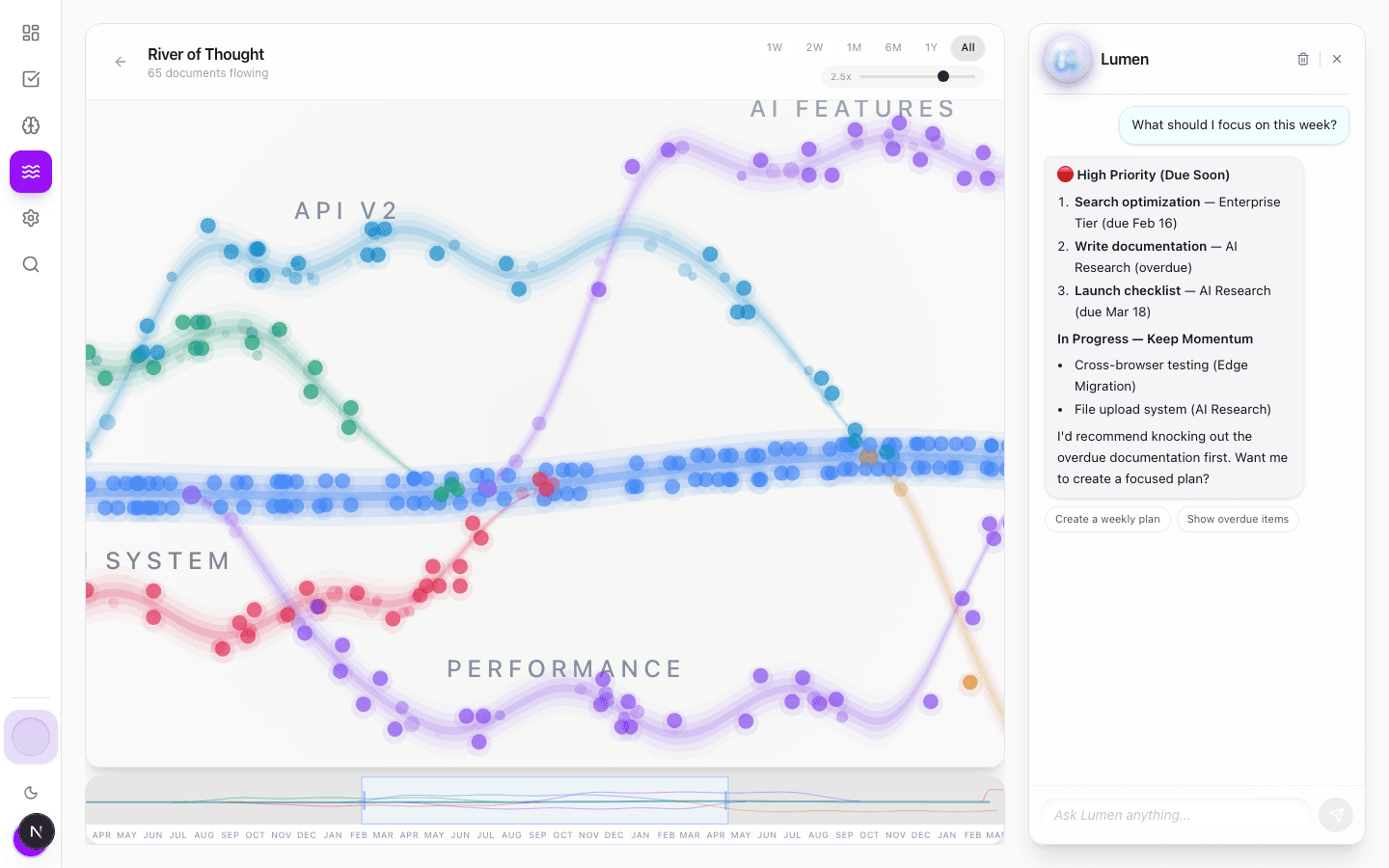
Interactive lessons & quizzes
Meeting prep & action items
Live web research
Learns your preferences
Zero setup needed
Built different
One app.
Four superpowers.
Capture.
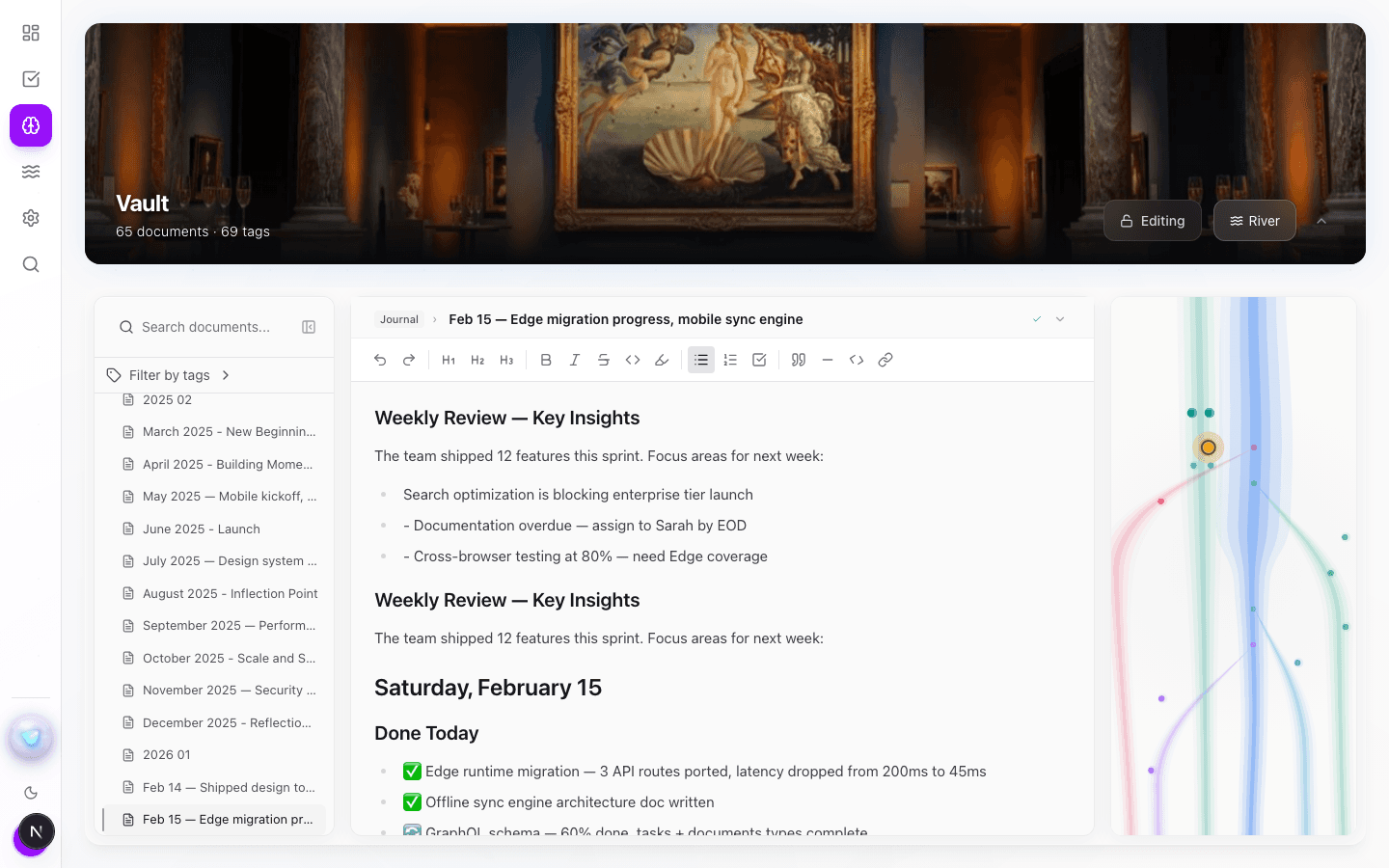
Record a meeting or paste the mess — notes, brainstorms, anything. Lumen transcribes it, creates organized docs, extracts tasks with deadlines, and files everything in the right place. No formatting. No organizing. Just capture.
- ✓Record meetings or paste anything
- ✓Auto-extract action items
- ✓Smart project organization
The Mac app records both sides of the call — you and remote participants — using your system audio. In the browser, recording captures your mic only: perfect for in-person meetings and voice notes.
Act.
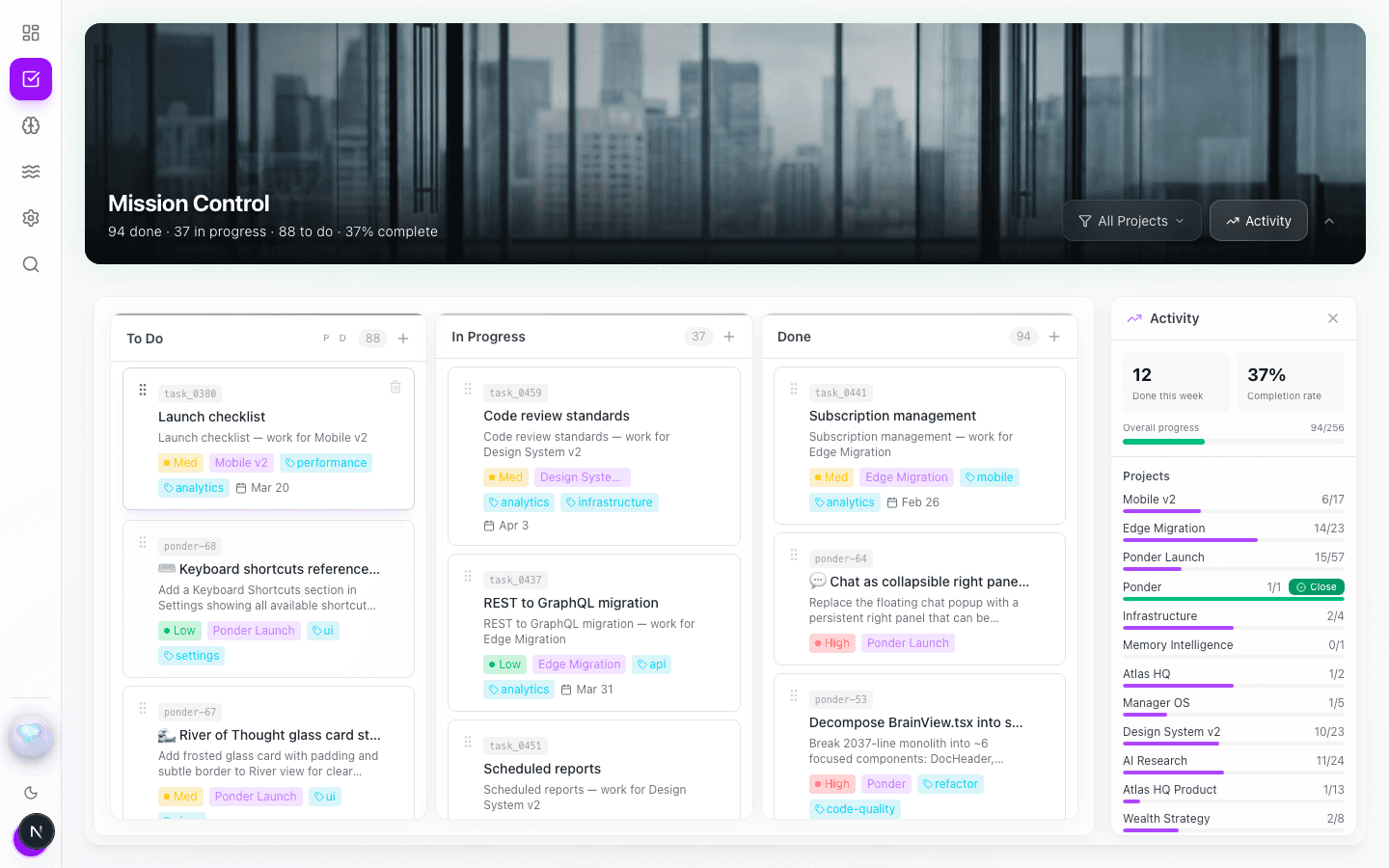
A kanban board that connects to your notes. Write meeting notes and PonderOS creates tasks automatically. Your notes become your to-do list.
- ✓Visual kanban with drag & drop
- ✓AI-generated tasks from notes
- ✓Project tracking & analytics
Build.
Specs, design reviews, research, plans, architecture — living docs beside the tasks that execute them. Mermaid diagrams render right in your notes, and your agents can read and write every one.
- ✓Living docs beside their tasks
- ✓Mermaid diagrams render inline
- ✓Readable & writable by your agents
Auth redesign — RFC
Owner: Lumen · linked to 3 tasks
mermaid
Think.
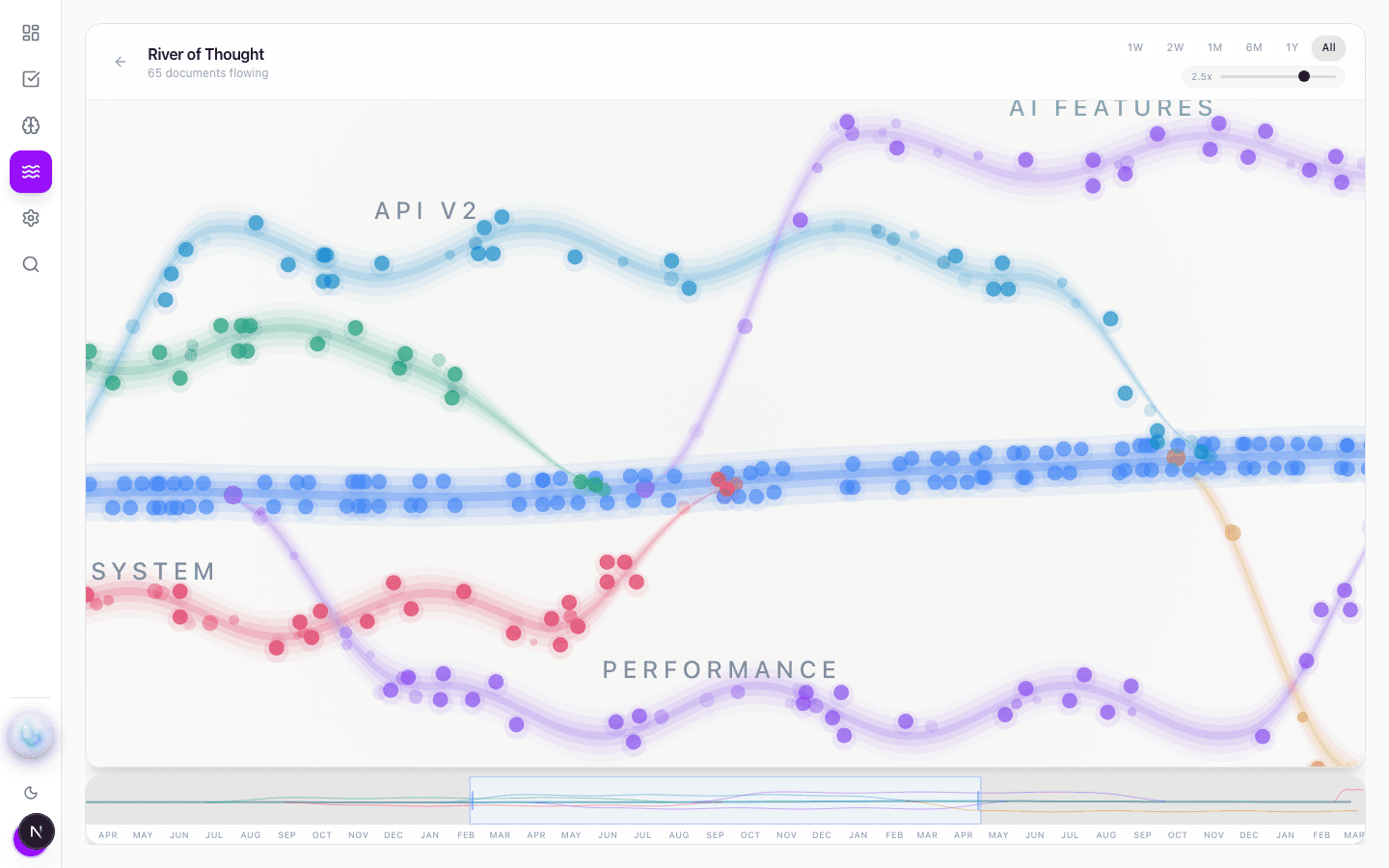
Watch your ideas flow. The River of Thought shows how your notes connect, branch, and evolve. The most beautiful way to see how you think.
- ✓Visual knowledge graph
- ✓See connections between ideas
- ✓Discover patterns you missed
A teammate with hands
It works
while you sleep.
Assign a task to Lumen the way you would a teammate. It picks it up on the spot, does the work, and leaves a draft in In Review for you. Nothing ships without your sign-off — you wake up to work that's ready to check, not surprises.
Assign it
Hand a task to Lumen from any note or your board — “draft the follow-up,” “research this,” “summarize the thread.”
Lumen works
It starts immediately, works in your actual docs and tasks, and keeps going while you get on with your day.
You review
The result lands in In Review — never auto-done. Approve it, tweak it, or send it back. You stay in control.
Built AI-first
Humans and agents,
working the same board.
PonderOS isn't a chatbot bolted onto a notes app. It's a workspace where people and AI work on the same tasks and the same docs — assign work to Lumen, or bring your own agents.
Connect over MCP
Plug Claude Code, Claude Desktop, or Cursor straight into your workspace with 20 tools. No glue code.
Agents pick up work
Your agents read tasks off the board, write docs into the vault, and move tickets to done — the same board you work on.
One shared surface
Workspaces are where people and agents collaborate — same tasks, same docs, same context. Not a silo for each.
The whole loop, hands-off
Built this way
Code from your phone. Really.
Start a Claude Code session at your desk and connect it to PonderOS over MCP. Then walk away — from your phone, assign tickets on the board and your agent picks them up, ships the work, and drops the results back as docs and In Review cards.
This page was built exactly that way.
Why PonderOS?
Built by someone who lives
in back-to-back meetings.
“Every call ended the same way: notes in one app, action items I'd retype into another, follow-ups I'd forget by Friday. I built PonderOS so the meeting turns into finished work on its own — and I get my evenings back.”
— Mo, Founder
Pricing
Simple pricing.
No surprises.
Start free. Upgrade when you need more.
Founding members get discounted pricing forever. Once 25 spots fill, prices go up permanently.
Free
Forever. No catch.
- ★ Lumen runs 2 agent tasks a month for you
- ✓ Bring your own agents over MCP — 1 key, 1,000 calls/mo
- ✓ 15 Lumen queries/mo
- ✓ 60 recording minutes/mo
- ✓ 1 shared workspace · 3 members
- ✓ 25 documents
Pro
🏆 Founding price — locked forever
- ✓ Everything in Free
- ★ Lumen runs 20 agent tasks a month for you
- ✓ Full personal MCP access — higher call limits
- ✓ 150 Lumen queries/mo
- ✓ 600 recording minutes/mo
- ✓ 3 workspaces · 10 members each
- ✓ Unlimited documents
- ✓ Cloud sync across devices
Premium
🏆 Founding price — locked forever
- ✓ Everything in Pro
- ★ Lumen runs 60 agent tasks a month for you
- ★ Unlimited team workspaces — no per-seat pricing
- ✓ Workspace MCP keys for your whole team
- ✓ Unlimited Lumen queries (fair use)
- ✓ 1,500 recording minutes/mo
- ✓ Deep research mode + web search
Questions & answers.
Is PonderOS really free?
Yes. The free tier is free forever — 25 documents, 15 Lumen queries a month, 2 agent tasks Lumen runs for you, and your own agents over MCP, all at no cost. We make money from higher limits, team workspaces, and premium AI features.
Can I import from Obsidian?
Yes. Point PonderOS at your Obsidian vault and it imports everything — markdown files, folder structure, tags, all of it. Your notes come with you.
Is my data private?
Your data is stored securely in the cloud with encryption. We take privacy seriously — your notes are yours.
Does the AI require an API key?
No. Built-in AI works out of the box. Premium AI features use our infrastructure — no setup, no keys.
Mac, Windows, Linux?
PonderOS runs in your browser at ponderos.com — no download needed. The Mac desktop app is available now (download above); Windows and Linux are coming soon.
Can I record meetings in the browser, or do I need the Mac app?
Both record — the difference is what they capture. The Mac desktop app records both sides of a remote call (you and the other participants) because it can access your system audio. In the browser, recording is mic-only: it captures your voice — great for in-person meetings and voice notes — but it can’t hear the other end of a Zoom or Teams call. That’s an operating-system limit on browsers, not a paywall — the desktop app is free. For remote calls, grab the Mac app above.
Who is PonderOS for?
Meeting-heavy people who sell their time — consultants, fractional execs, agency-of-one founders, and managers who buy their own tools. If your day is back-to-back calls and the follow-ups pile up faster than you can process them, PonderOS is for you.
What is Lumen?
Lumen is your AI teammate — it works inside your docs and task board, not a chatbot in a sidebar. Record a meeting or paste anything and it turns it into structured docs and tracked tasks. Assign it real work and it does it, leaving a draft in In Review for your sign-off.
Record the meeting.
Let Lumen do the rest.
Join the Founding 25 and put your AI teammate to work.
Get Started Free →Download for Mac
Records both sides of remote calls — you and participants — via system audio. (Browser recording is mic-only.)
Not sure which? Apple menu → About This Mac — “Apple M1/M2/M3…” = Apple Silicon, “Intel” = Intel.
First launch: right-click the app → Open (unsigned beta). Updates install automatically. Tip: set PonderOS to “Alerts” in System Settings → Notifications so the meeting Record button shows on the popup.